Why WhatsApp Matters in Kuwait
WhatsApp is part of everyday life in Kuwait. It's where customers chat with family and friends, and where many of them expect to reach the businesses they buy from.
If you're not using WhatsApp for business communication in Kuwait, you're missing your customers where they live. See how our WhatsApp business inbox brings it all together.
Social Hub's WhatsApp Business Suite
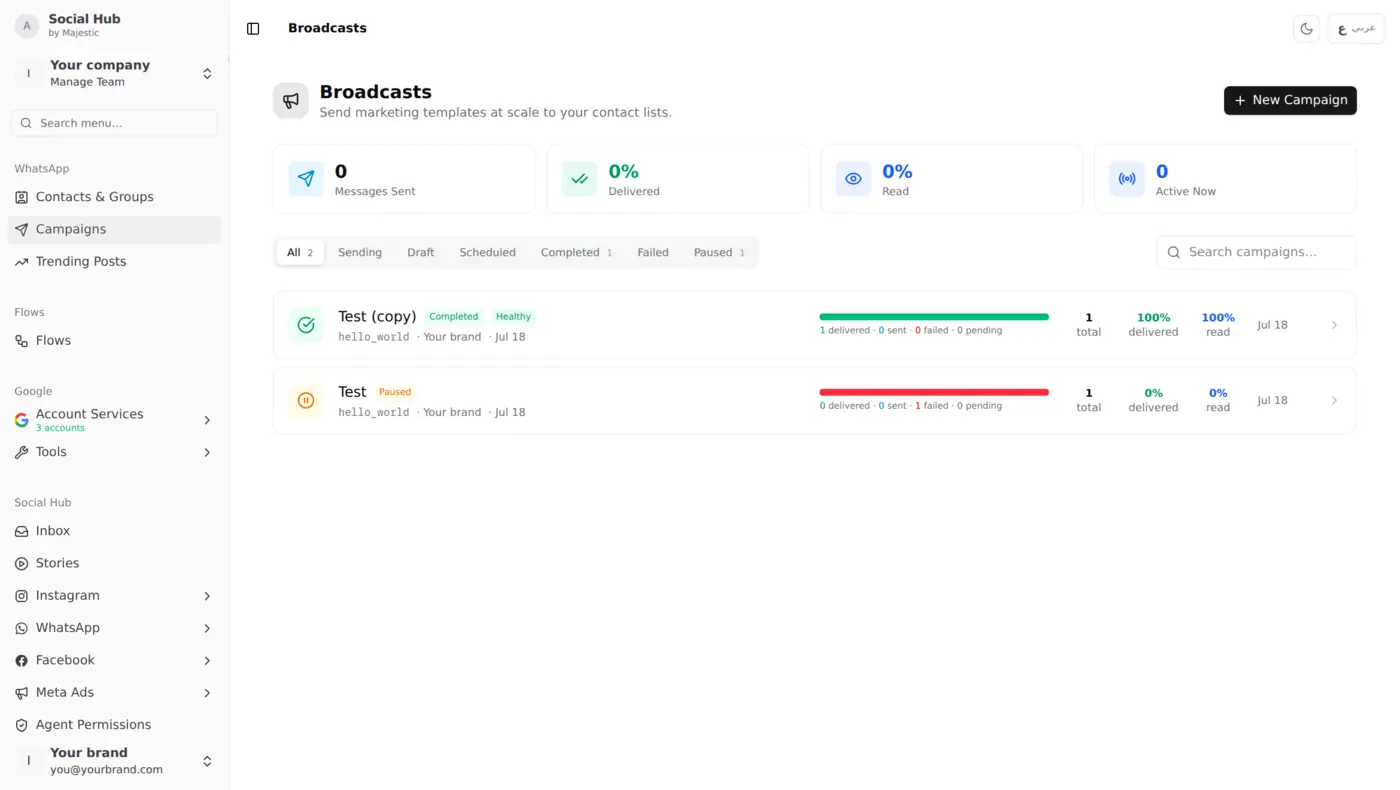
Social Hub brings WhatsApp into the same unified workspace as Instagram and Facebook. Here's the campaign dashboard, where every broadcast shows how many messages were delivered and read:
Contact Management (CRM-Style)
Build your customer database:
- Import contacts from Excel/CSV
- Organize into groups (VIPs, new customers, geographic areas)
- Add tags and notes to each contact
Group Management
Create targeted lists for different campaigns:
- "Salmiya branch customers"
- "VIP buyers (spent > 100 KD)"
- "Electronics interest"
- "New subscribers this month"
Broadcast Campaigns
Send targeted messages to entire groups:
- Approved WhatsApp templates for every campaign
- Image headers for templates that include one
- Schedule campaigns for the time that suits your audience
Template Management
WhatsApp requires pre-approved templates for outbound messaging:
- Create and manage templates from Social Hub
- Track approval status
- Preview how templates render on mobile
- Multi-language templates (Arabic + English)
Analytics Dashboard
Track every campaign:
- Messages sent / delivered / read / failed
- A clear record for each campaign, so you can compare sends over time
Trending-to-WhatsApp
Social Hub's intelligence features connect directly to WhatsApp:
- One of your posts performing well? Send it to a contact group as a WhatsApp broadcast in a few clicks
- Found a product customers keep asking about through Demand Intelligence? Broadcast it to your interested customer group
- Spotted a competitor promotion? Schedule a campaign so your VIP customers hear about your own offer
Compliance & Best Practices
Built-in safeguards, plus a few habits worth keeping:
- Campaigns send only approved templates
- Contacts who reply STOP are excluded automatically
- Respect WhatsApp's messaging limits
- Best practice: message customers who agreed to hear from you
What You Can Do With It
Import your existing customer list, split it into groups by interest (phones, laptops, accessories), and when you have an offer worth sharing, send an approved template to just the group that cares about it. Afterwards, the campaign view shows how many messages were delivered, read or failed, so you can plan your next send with confidence.
Getting Started
- Connect your WhatsApp Business number (requires Meta Business verification)
- Import your contact list
- Create your first group
- Set up an approved template
- Send your first campaign
Start with a small test group and scale once you see results.
Keep Reading
- One Inbox for Everything: manage WhatsApp alongside Instagram and Facebook
- Auto-Reply Rules & Macros: automate WhatsApp responses
- Team Performance Dashboard: track your team's response metrics